Checkout with Confidence
Payment Security Guaranteed
Return with Ease
Fast & Hassle-Free Process
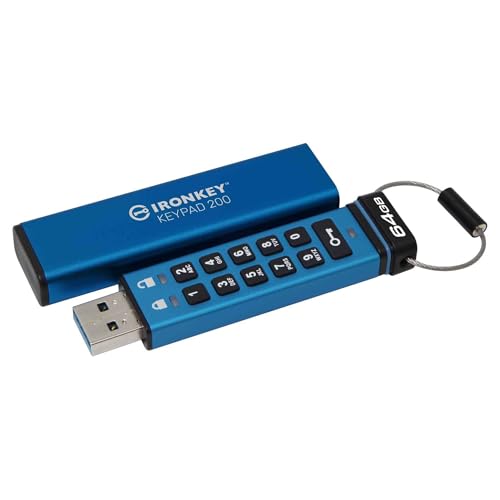
This product — Kingston IronKey Keypad 200 Type -A hardware-encrypted USB Flash Drive FIPS 140-3 Level 3 (Pending) with XTS-AES 256-bit Hardware Encryption - IKKP200/64GB
Refer to the product listing for full specifications and care instructions. Check compatibility before purchase.
Kingston IronKey Keypad 200 64GB Encrypted USB Flash Drive with XTS-AES 256-bit Security
Key Takeaway
This hardware-encrypted USB flash drive offers top-tier security with XTS-AES 256-bit encryption and is designed for those who prioritize data protection, such as businesses or individuals handling sensitive information. Priced at £166.75, it meets the rigorous FIPS 140-3 Level 3 standards (pending certification), ensuring your files are safe from unauthorized access. Ideal for anyone looking to keep their data secure while on the go!
Frequently Asked Questions
What is Kingston IronKey Keypad 200 Type -A?
The Kingston IronKey Keypad 200 Type -A is a hardware-encrypted USB flash drive designed for secure data storage. It features FIPS 140-3 Level 3 (Pending) certification and utilizes XTS-AES 256-bit hardware encryption to protect sensitive information.
How much does Kingston IronKey Keypad 200 Type -A cost?
The price of the Kingston IronKey Keypad 200 Type -A is £166.75. This investment provides robust security features, making it ideal for users who prioritize data protection.
What are the key features of Kingston IronKey Keypad 200 Type -A?
Key features of the Kingston IronKey Keypad 200 Type -A include hardware encryption, a keypad for secure access, and FIPS 140-3 Level 3 (Pending) compliance. It also offers XTS-AES 256-bit encryption, ensuring high-level data security.
Who is Kingston IronKey Keypad 200 Type -A best for?
The Kingston IronKey Keypad 200 Type -A is best suited for professionals and organizations that handle sensitive data, such as government agencies and financial institutions. Its high-security features make it ideal for anyone needing to protect confidential information.
How do I use/care for Kingston IronKey Keypad 200 Type -A?
To use the Kingston IronKey Keypad 200 Type -A, simply connect it to a USB port and enter your PIN on the keypad to access your files. For care, keep it in a dry, cool place and avoid exposing it to extreme temperatures to ensure longevity.
Fast Delivery
Quick & reliable shipping
Secure Shopping
100% secure transactions
Great Prices
Competitive deals daily
Expert Support
Here to help you choose
More Products You Might Like from flashmemory
View All



Please Note: When you order through these links, we may earn a commission at no additional cost to you.